Floor plan with tables
Rooms and tables laid out like your restaurant. Open tables are marked; tables can be merged and moved – with a table-change ticket for the kitchen if you want.

With Keksu’s restaurant POS, your team takes orders at the table, sends them to kitchen and bar, and splits the bill when guests pay.

Your team takes the order right at the table.
The ticket goes to the right station. The kitchen display shows the team what is next.
Split the bill by guest or item and record tips.
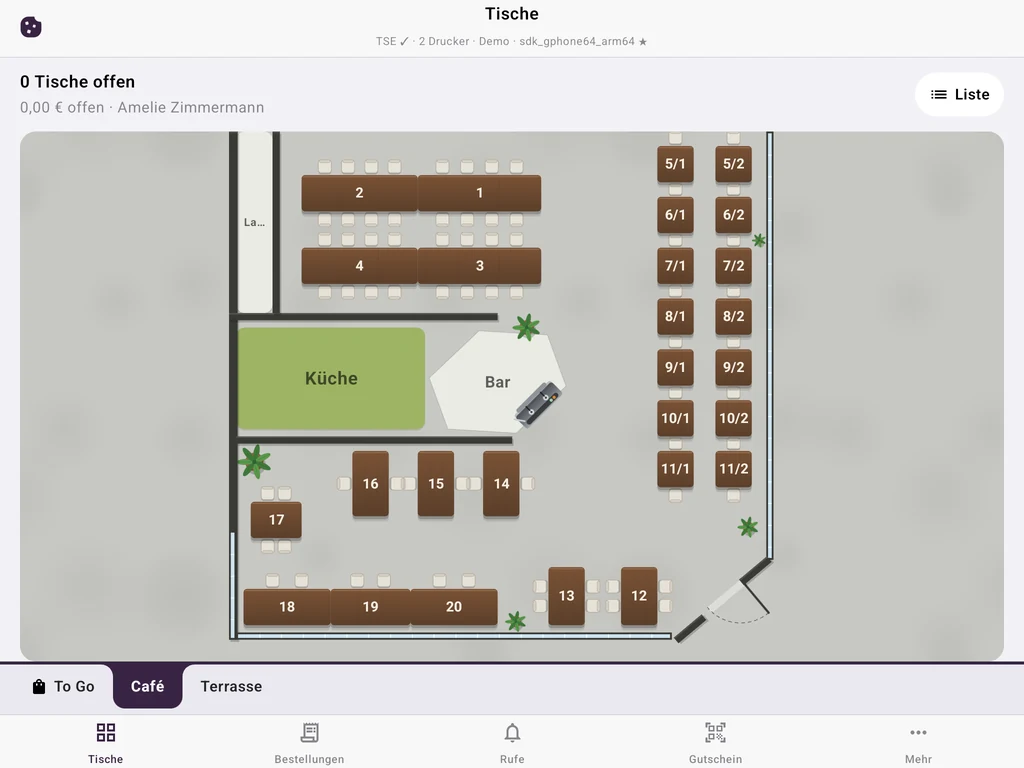
Rooms and tables laid out like your restaurant. Open tables are marked; tables can be merged and moved – with a table-change ticket for the kitchen if you want.
Every category has its station: food prints in the kitchen, drinks at the bar. Extras and kitchen notes are on the ticket.
Orders as cards on a screen instead of paper. “Ready” in the kitchen, “Served” on the pick-up screen – longest wait first, with a sound.
Guests scan the QR code at the table, reorder and call service or tap “pay please”. Everything arrives in the POS with the table number.
Split by guest or item, print an interim bill, record tips per payment. With SumUp the amount goes to the terminal automatically.
Sell and redeem vouchers, stamp cards in Apple and Google Wallet. In the Team plan you also plan shifts and track working hours.
Cloud TSE included. Cancel monthly.
We set up your menu, printers and card terminal with you, free of charge.
€19per month
Additional device: €15 / month
€49per month
Additional device: €12 / month
€99per month
Additional device: €9 / month
Monthly prices per venue, excluding VAT. One-off TSE setup €80 per venue.
Every device with the POS app signed in counts: the tablet at the counter and every service phone. Pro includes three devices, Team five; each additional one costs €12 (Pro) or €9 (Team) a month. Kitchen display, pick-up screen and TV display do not count as POS devices.
Receipt printers on Wi-Fi or LAN that speak ESC/POS – the standard for receipt printers. The POS app finds printers on the network and you assign each category its printer. Or run the kitchen display in a browser on a tablet or TV.
Yes. Your team splits the bill by guest or moves individual items to a partial bill. Every partial payment gets its own TSE receipt and tips are recorded per payment.
Ordering, printing tickets and cash payments continue on the Wi-Fi. Receipts get their TSE signature added once the connection is back. SumUp card payments and QR ordering need internet.
Yes. Enter the amount on the terminal and book “card” in the POS – that works with any terminal. SumUp terminals are connected directly: amount and tip go to the device automatically. Plus instant transfer via QR code without card fees.
Set up rooms and tables, take trial orders and split a bill. No payment details.
Questions? We can help.
Ask the AI assistant or write to us.
You are talking to an AI assistant. Answers are non-binding and not legal or tax advice. Please do not enter personal data.
AI answers can contain errors. Binding are /preise, our terms and our team.
Prefer a person? 030 23320766 · info@keksu.de · Message
Or contact us directly:
030 23320766Call info@keksu.deEmail – support on working days Send a message

