Service phones as tills
POS app for iPhone and Android or browser POS on the tablet. Every device books to the same tables and the same daily closing.

Every service phone with the POS app is a till. New devices join with a setup code, temporary staff sign in with a PIN. Switch between counter and table service per event – and on the Wi-Fi everything runs without internet too.

Small event: one tablet. Big one: five service phones on top. Every device with the POS app counts as a POS device; Starter, Pro and Team include one, three or five, each additional one costs €15, €12 or €9 a month.
Tiles with images, tap the payment method, done. Everyone signs in with name and PIN, so every receipt shows who took the payment.
On your own Wi-Fi all devices sync through the main till. Cash and card at the terminal are booked, tickets printed; the TSE signature follows once there is internet.
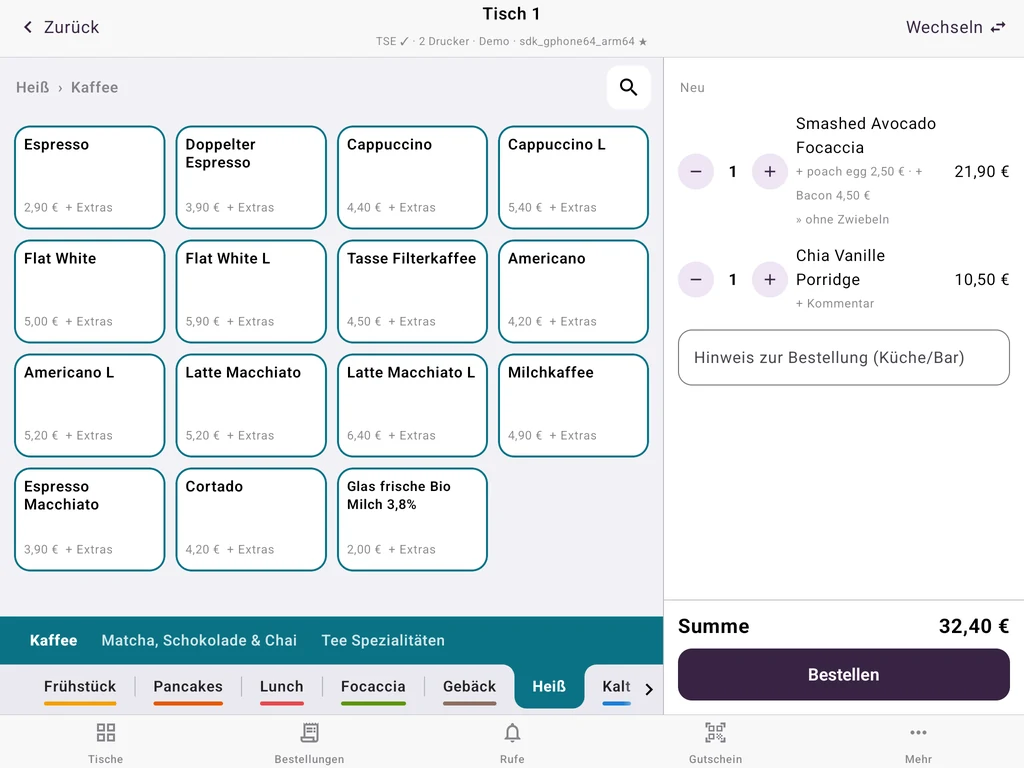
POS app for iPhone and Android or browser POS on the tablet. Every device books to the same tables and the same daily closing.
Standing reception with a counter, gala dinner with tables: switch the mode in the admin. Open tables are kept when you switch.
Signing in a device means entering a code from the admin. After the event you sign it out and free up the slot.
Daily closing with revenue per tax rate, payment methods and counted cash – on a receipt or as PDF. Every staff member sees their own settlement.
SumUp terminal connected directly, any other terminal as payment method “card”. Instant transfer via QR code without card fees, tips per payment.
Sell and redeem vouchers for the next event, stamp cards for the venue’s regulars in Apple and Google Wallet. Included in the Pro plan.
Cloud TSE included. Cancel monthly.
We set up your menu, printers and card terminal with you, free of charge.
€19per month
Additional device: €15 / month
€49per month
Additional device: €12 / month
€99per month
Additional device: €9 / month
Monthly prices per venue, excluding VAT. One-off TSE setup €80 per venue.
You pay for POS devices signed in during the billing month. After the event you sign devices out in the admin; when you need them again, you generate a new setup code. Plans can be cancelled monthly.
With your own Wi-Fi router, yes: all devices sync through the main till, take cash and card payments at the terminal and print tickets. The TSE signature is added once there is internet. SumUp payments, QR ordering and the cloud TSE itself need internet.
Install the POS app, enter the setup code from the admin, sign in with a PIN. Menu, tables and printers are already there because everything belongs to the venue, not the device.
In the Team plan, yes: shift plan, time clock by PIN or QR code, staff app and payroll export. Tips from card payments are distributed by hours worked in the monthly closing.
Sign in two phones with a setup code and take trial payments on the same tables. No payment details.
Questions? We can help.
Ask the AI assistant or write to us.
You are talking to an AI assistant. Answers are non-binding and not legal or tax advice. Please do not enter personal data.
AI answers can contain errors. Binding are /preise, our terms and our team.
Prefer a person? 030 23320766 · info@keksu.de · Message
Or contact us directly:
030 23320766Call info@keksu.deEmail – support on working days Send a message

