
Key points
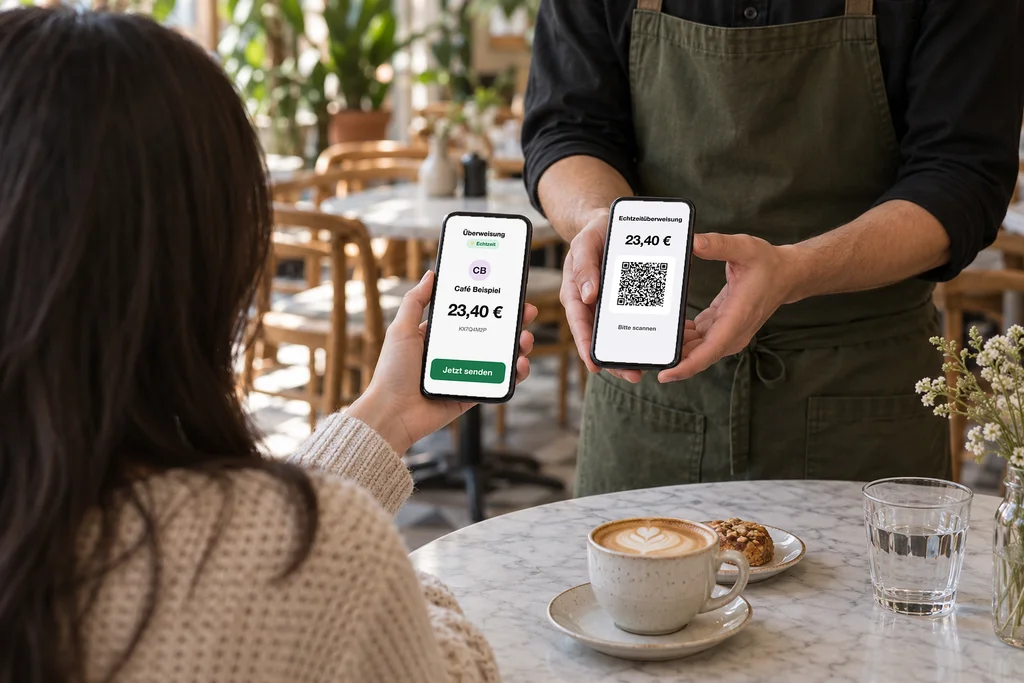
- The QR code contains IBAN, payee, amount and payment reference. The banking app fills in the transfer with it.
- Since October 2025, all banks in the euro area must send and receive instant transfers, at the same price as regular transfers.
- With Qonto and Revolut Business the POS checks the payment automatically; with other banks, staff confirm it.
- Limits: some apps do not scan the code, and guests without a euro account cannot pay this way.
What the QR code contains
The code follows the European Payments Council standard, often called “GiroCode” in Germany. It contains the payee name, the IBAN, optionally the BIC, the amount and a payment reference of up to 140 characters. The banking app reads it in; the guest only has to confirm.
The code has no flag of its own for “instant”. Whether the transfer arrives within seconds is chosen by the guest in their app. That is why the POS screen says in large letters: “Please pay by instant transfer”.
What guests need and what it costs
A current account in the euro area and a banking app. Since 9 October 2025, all banks in the euro area must offer instant transfers and may not charge more for them than for a regular transfer (Regulation (EU) 2024/886).
For you as a business there is no percentage of revenue. Depending on your account, your bank charges per booking, as with any other transfer.
How the POS detects the payment
The POS needs to know whether the money has arrived. There are two ways:
- Automatically: With banks that offer an API for business customers, the POS reads incoming payments and finds the payment by its reference. Keksu does this today with Qonto and Revolut Business.
- By staff: With all other banks, staff see the payment in the business banking app and confirm it in the POS.
Why not automatically with every bank? Via the EU interface for account data (PSD2), a service may query at most four times a day without the account holder present. That is not enough for confirmation within seconds at the table.
The name must match
Since October 2025, banks check the payee name against the account holder for every transfer. If it differs, the guest gets a warning and may cancel. So enter the name in the POS exactly as it appears at your bank, e.g. including “GmbH”.
What does not work
- Some banking apps (such as N26 or Revolut) do not scan the code. The guest then types in the IBAN and payment reference; both are shown next to the code.
- Guests with accounts outside the euro area cannot pay this way.
- Scanning and confirming takes about half a minute, longer than contactless by card.
So in most businesses, the QR bank transfer does not replace the card terminal. It is a payment method that saves you the card fee for every guest who uses it.
How to set it up in Keksu
- In the admin: Settings › Payments › Instant bank transfer.
- Choose your bank: Qonto, Revolut Business or “Other bank”.
- For Qonto, enter login and secret key; for Revolut, upload the certificate and grant access; for other banks, just the IBAN.
- Enter the payee name as it appears at your bank.
- The payment method “Instant bank transfer” appears in the POS. The guest chooses the tip on the screen beforehand.
Outlook: Wero
Wero is the joint payment method of European banks. It is meant to combine instant transfer and confirmation in one step. At the till it currently works in Belgium and Luxembourg; there is no date for Germany yet. Once it arrives, QR payment will become even simpler.
Frequently asked questions
Is an instant transfer free for the guest?
It may not cost more than a regular transfer (Regulation (EU) 2024/886). With most current accounts, that is free.
Can the guest reverse the payment?
A completed transfer cannot simply be reversed by the guest like a direct debit.
What if the banking app cannot read the code?
Then the guest types in the IBAN and payment reference. The POS shows both next to the code.
Do I need a particular bank?
No. With Qonto and Revolut Business the POS checks the payment automatically; with any other bank, staff confirm it.
How does the payment appear on the receipt?
As a non-cash “bank transfer” payment with TSE signature. If staff confirmed it, it says “bank transfer (manual)”.
Sources
- European Payments Council: Quick Response Code Guidelines (EPC069-12)
- Regulation (EU) 2024/886 on instant credit transfers
- Rödl & Partner: introduction of Verification of Payee (10 Oct 2025, German)
- EBA Q&A 2018_4172: access to account information
- Börsen-Zeitung: Wero joins standards body for POS terminals (German)
Try it at your own pace.
Explore the features in our demo business and see how Keksu fits your day.
See payments in Keksu